
AWWS GFA
AWWS was retired on February 28, 2024. NAV CANADA's Aviation Weather Web Site no longer exists. Everything it did now lives on CFPS — the live GFA links below are current and working.
If you typed "AWWS" into a search engine and landed here, you're probably looking for NAV CANADA's Aviation Weather Web Site — the site generations of Canadian student pilots were taught to use for GFAs, METARs, TAFs, and NOTAMs before every flight.
Here's the short answer: AWWS no longer exists. NAV CANADA decommissioned the Aviation Weather Web Site on February 28, 2024, after more than two decades of service. If you have an old bookmark, a school handout, or a ground school textbook pointing you to AWWS, it's out of date.
The good news: everything AWWS did still exists — it just lives somewhere else now. This page covers where each product went, links you straight to the live GFAs, and shows you how to build your pre-flight weather picture with the current tools.
Live GFA Regions
All links open NAV CANADA's live CFPS GFA viewer in a new tab (public — no account needed). Select your region on their page. The GFACN codes are how the regions are identified on the charts themselves — worth knowing for your written exam.
| Pacific — GFACN31 | Prairies — GFACN32 |
| Ontario – Quebec — GFACN33 | Atlantic — GFACN34 |
| Yukon & Northwest Territories — GFACN35 | Nunavut — GFACN36 |
| Arctic — GFACN37 | British Columbia — Localized Graphic Forecast |
Also on CFPS: METAR / TAF / NOTAM recall • New here? Read How to Read a GFA like a Professional first.
What Replaced AWWS
NAV CANADA split AWWS's functions across its modern flight planning platform:
Collaborative Flight Planning Services (CFPS) — plan.navcanada.ca — is the primary replacement. This is where you now retrieve METARs, TAFs, GFAs, SIGMETs, AIRMETs, PIREPs, upper winds, and NOTAMs, and it's also where you file, amend, delay, or cancel VFR and IFR flight plans. One account, one workspace, weather and flight planning together — which, once you're used to it, is genuinely an improvement over bouncing between AWWS and a separate filing process.
The NAV CANADA Flight Planning Workspace presents the same data in a map-based planning view — draw your route and see the weather along it.
1-866-WX-BRIEF hasn't gone anywhere. Flight Information Centres still provide interpretive briefings by phone, and for a student pilot uncertain about a marginal day, talking to a briefer remains one of the most underused tools in Canadian aviation.
The Aviation Meteorology Reference (avmet.navcanada.ca) took over AWWS's educational content — the theory behind the products, not live data. Useful for ground school study; not for operational use.
What a GFA Looks Like
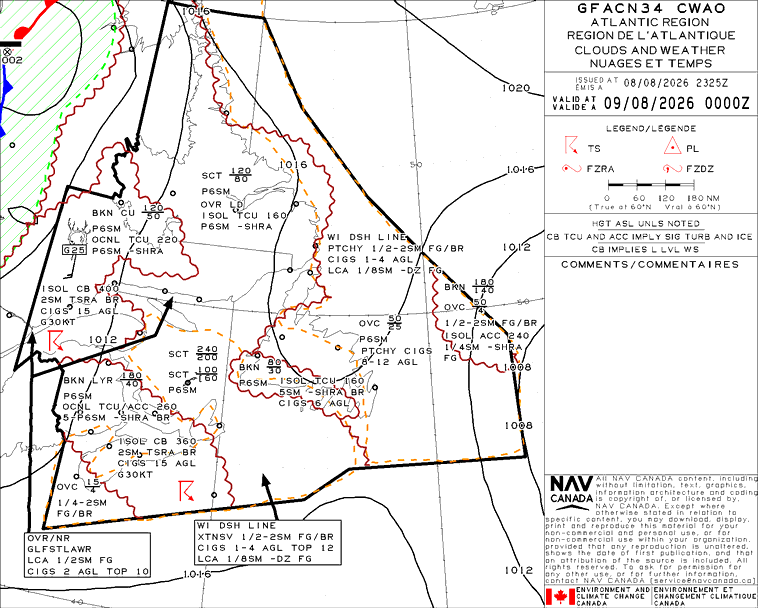
The GFA made the jump from AWWS intact: same product, same two-panel format (Clouds & Weather, and Icing / Turbulence / Freezing Level), same issue and validity times. Only where you click changed. Reading it is the skill that matters — our full walkthrough covers every symbol, both panels, and the interpretation mistakes we see students make on Transport Canada written exams: GFA: How to Read a GFA like a Professional.
Why You'll Still Hear "AWWS"
Aviation vocabulary has a long half-life. Instructors who trained on AWWS still say "check AWWS." Older editions of study texts reference it. Some flight school websites still link to it. And Transport Canada written exams test the weather products themselves — GFA, METAR, TAF — which are unchanged, so nothing about the AWWS retirement affects what you need to know for your PPL or CPL exam. Know the products; the website that serves them is just plumbing.
If your ground school materials still teach the AWWS interface, that's a sign the material hasn't been updated in a few years. Our Private Pilot and Commercial Pilot Ground School courses teach weather retrieval on the current CFPS tools, because that's what you'll actually use on your flight test and every flight after it.
Your Pre-Flight Weather Flow in 2026
- CFPS (plan.navcanada.ca) — GFA first for the big picture, then METARs and TAFs for departure, destination, and alternates, then SIGMETs / AIRMETs and PIREPs, then NOTAMs.
- Cross-check trends — is the actual weather doing what the forecast said it would? A METAR that's already worse than the TAF predicted is telling you something.
- Call 1-866-WX-BRIEF when anything is unclear — briefers interpret; websites just display.
- File your flight plan in the same CFPS session — the one genuine workflow improvement over the AWWS era.
The site changed. The discipline didn't: a thorough weather picture before every flight, built from the GFA down to the METAR, is what separates a professional pre-flight from a glance at an app.
Related reading: How to Read a GFA • Aviation Weather • Canadian Flight Supplement • PPL Ground School